

Key Takeaways
- A CRM (Customer Relationship Management) tool centralizes leads, customer communication, and deal tracking in one platform.
- Most small businesses need a CRM when manual tracking leads to missed follow-ups or a lack of visibility into sales history.
- The best CRM for a small business is the one your team will use consistently, regardless of advanced features.
- Affordable CRM options like HubSpot, Monday CRM, and Bigin by Zoho offer free or low-cost tiers for early-stage companies.
Is your customer data scattered across spreadsheets and sticky notes (or buried in your inbox)?
That “organized” chaos is an expensive liability.
But transition all that data to a CRM tool? You can reclaim your time and ensure no opportunity falls through the cracks.
The difference is remarkable. Businesses that use a CRM tool see a 29% increase in sales, a 34% increase in sales productivity, and a 42% increase in sales forecast accuracy.
I’ve put together a customer relationship management tools list to help you consider your options. So you can stop chasing your inbox and start closing more deals.
What is a CRM tool?
A CRM is software that helps you manage the full trail of customer activity: who someone is, how they found you, what they asked for, what you quoted, what happened next, and what still needs attention.
At its simplest, a CRM is a better contact and follow-up system. At a more advanced level, it can become the operating hub for sales, service, marketing, and reporting.
Most CRM software is built around a few core functions:
- Contact management
- Deal or pipeline tracking
- Task and follow-up reminders
- Email and calendar integration
- Notes and communication history
- Reporting and dashboards
From there, many systems expand into broader features such as:
- Marketing automation
- Customer service ticketing
- Proposal or document storage
- Mobile access
- Quotes, invoices, or payment tracking
- Workflow automation
- Social media or third-party app integrations
Why do small businesses need CRM software?
A CRM will help your Raleigh business in a few specific ways.
1. It reduces the cost of disorganization
Whether you realize it or not, you pay for disorganization in labor time, slower response times, rework, missed revenue, and preventable confusion.
A CRM can automate or simplify work like:
- Logging calls and emails
- Setting follow-up tasks
- Updating deal stages
- Sending reminders
- Routing leads to the right person
That saves time AND reduces the number of routine things people forget.
2. It gives you a usable sales process
With most small businesses, the owner knows what’s going on with sales. The team sort of knows. But there’s no dependable way to see where opportunities stand.
That becomes a problem in your business when you want to forecast, delegate, or improve close rates.
A CRM gives structure to the pipeline to let you see what’s new, active, stalling, and closing. And when your pipeline is visible, it becomes much easier to forecast revenue and make smarter financial decisions.
3. It improves customer continuity
Customers notice when your team remembers prior conversations, prior purchases, open issues, or preferences. A CRM helps create that continuity because the relationship is no longer sitting in one person’s memory alone.
4. It helps you personalize
A CRM tells you what the customer bought, when they last engaged, what they care about, and where they are in the process. That makes your outreach more relevant without requiring you to reinvent the wheel every time.
5. It creates better reporting
A good CRM helps you see trends you would otherwise miss, like:
- How many leads came in this month?
- How many became paying customers?
- What is our average sales cycle?
- Which source is producing the best opportunities?
- Where do deals tend to stall?
The best CRM tool for small businesses
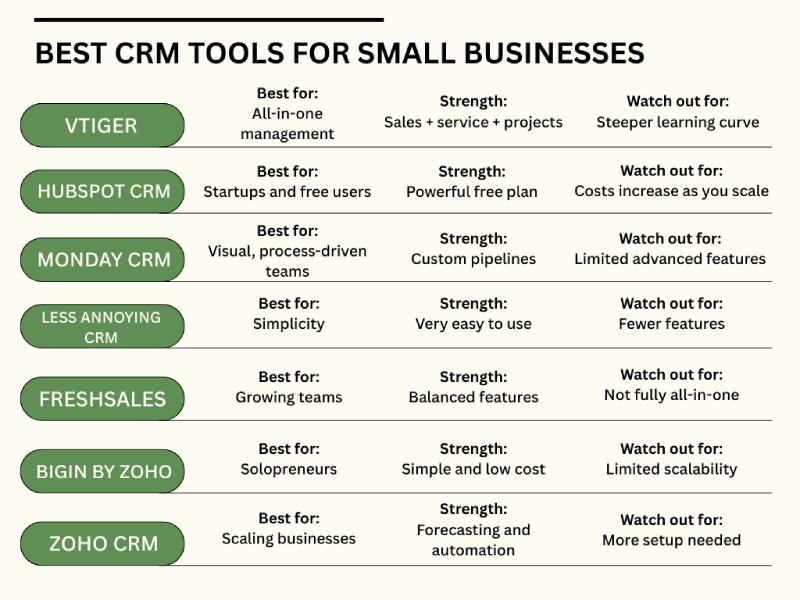
Vtiger is considered the best all-in-one CRM for small businesses.
It combines contacts, deals, marketing, help desk, inventory, documents, and project-related tools in one system. So, if you’re tired of jumping between disconnected apps, that can be appealing.
Vtiger’s best features are its:
- Highly customizable modules
- Connected workflows across sales, service, and projects
- Flexible pricing based on user access
- Useful AI-assisted features and analytics
One of the biggest practical advantages is the connection between modules. If a deal closes, you can move it into a project or service follow-up without starting from scratch.
Its AI layer also adds tools like suggested email replies, recommended documents, deal scoring, next-best-action prompts, and chatbot support functions.
Now, the thing to consider with Vtiger is that the learning curve is somewhat steep. It may be more system than your business needs if you’re just getting started.
But if your Clayton, Durham, and Chapel Hill business is already bumping into the limitations of separate tools for sales, service, and operations, it can make sense.
Best low-cost and free CRM tools for small businesses
Maybe for your business, the right starter CRM is the one that improves consistency without adding a big monthly overhead or a major implementation project.
Here’s a customer relationship management tools list of free or low-cost options worth considering.
1. Monday CRM
Best for: Teams that want a visual, easy-to-use system with flexible pipelines.
Monday CRM’s interface is easily customizable and visually approachable. If your team is more likely to engage with drag-and-drop boards than a dense database-style layout, it might be a helpful option.
It’s especially useful if your Raleigh business has multiple pipelines or workflows. You can set up unlimited pipelines and automate routine actions without heavy technical work.
Pricing starts at $12 per seat per month, billed annually.
2. HubSpot CRM
Best for: If you have a startup or want a strong free CRM option with room to expand.
HubSpot’s free CRM offers contact management, email templates, scheduling, call logging, and dashboard reporting. It could be a good fit if you own an early-stage business and want something polished and recognizable without immediate cost.
Best for: If you are a solo operator, have a small team, or want simplicity and don’t want to train around the software.
The name spills the beans. Less Annoying CRM is built for handling the basics well without a lot of complexity. It’s straightforward and easy to learn.
So, if you mainly need a dependable place to manage contacts, tasks, notes, and pipeline activity, it could be a great CRM to look into. It’s priced at $15 per user per month.
4. Freshsales
Best for: If your business is growing out of a very basic CRM but isn’t ready for a big all-in-one system.
Freshsales includes sales pipeline tracking, contact management, and a visual dashboard, with a free plan available for smaller teams. Also, their support is more available than in some competing entry-level products.
Their growth plan rate is $9 per user per month, billed annually.
5. Bigin by Zoho and Zoho CRM
Best for: If you’re a solopreneur, have a very small team, or eventually want a deeper CRM stack.
Bigin is geared toward smaller businesses that want basic pipeline and contact management without a lot of complications. They have a free plan for a single user, a $7 express plan, a $12 premier plan, and a $18 Bigin 360 plan, all per user per month, billed annually.
Zoho CRM is the more robust system. It adds more advanced capabilities like lead scoring, forecasting, and quote support. Their standard plan starts at $14 per user per month, billed annually.
From a growth perspective, you can start with Bigin if simplicity matters most right now. Then, you can move to Zoho CRM if you need more sales structure and forecasting later.
What should small business owners look for in a CRM tool?
You certainly don’t need every single feature on day one. What matters most to start out is whether the system helps you easily determine a few basic things:
- Who needs a follow-up that day
- What stage each active opportunity is in
- Which customers are overdue
- Where your best leads are coming from
- What happened the last time you spoke with a client
Once you’ve made a basic customer relationship management tools list of your top contenders, it also helps to think through a few practical issues.
- Are you mainly tracking leads, active customers, or both?
- Do you need marketing and service features, or just sales tracking?
- How important are email sync, phone integration, and mobile access?
- Will someone on your team maintain the system consistently?
- Do you need something simple now, or something you can grow into over the next few years?
A very basic CRM can be a smart choice if adoption is your biggest hurdle. But if you already know you need quotes, invoices, service cases, projects, and inventory connected together, picking too small a system may just create another migration project a year from now.
The right tool is the one that solves your current bottleneck without creating a bigger one too soon.
Final thoughts
I know I’ve talked quite a bit lately about software and operational improvements you can make in your business.
And I know the options (payroll systems, accounting platforms, time management tools, CRM software, oh my…) can start to blur together after a while.
I can help you look at all these decisions through a practical lens of what will save time, reduce friction, and support better financial decisions.
Let’s identify the gaps where software could boost your bottom line:
meet.billybarton-accountant.com/discovery
FAQs
“What is the best CRM for a small business in 2026?”
The best CRM for a small business is one that balances ease of use with essential automation. Zoho CRM and HubSpot are top-rated for scalability, while Bigin and Monday CRM are preferred for their visual interfaces and quick setup for smaller teams.
“Is there a free CRM for small businesses?”
Yes, several reputable platforms offer free tiers. HubSpot CRM provides the most robust free features for marketing and sales, while Zoho Bigin offers a free version tailored for single users or micro-teams needing basic pipeline management.
“When should a small business start using a CRM?”
A small business should implement a CRM as soon as manual tracking (like spreadsheets or email folders) leads to forgotten follow-ups or lost lead data. Typically, this happens when you are managing more than 20 active relationships or have more than two team members.
“Can a CRM help a small business increase sales?”
A CRM helps increase sales by automating follow-up reminders, ensuring no lead goes cold. By centralizing customer history, it also allows for personalized outreach and identifies which marketing sources are generating the most profitable deals, allowing you to double down on what works.
“How long does it take to set up a CRM for a small team?”
For a small team, a basic CRM setup typically takes 2 to 5 days. This includes importing your existing contact list, customizing your sales pipeline stages, and integrating your email and calendar. More complex systems with full automation may take 2–4 weeks.
“Do I need a CRM if I only have 5 employees?”
Yes. Even with a small team, a CRM helps prevent information silos. It ensures that if one employee is out, any other team member can step in, view the full communication history, and provide seamless service to the client.